
Investigate a MAC's full history
When you need this
Section titled “When you need this”- “This printer keeps disappearing from the network for a few minutes at a time — what’s its actual port history?”
- “Did host X really move between switches three times in an hour, or is one of our collectors lying?”
- “Show me everything we know about MAC
aa:bb:cc:11:22:33.”
In the TUI
Section titled “In the TUI”Press Ctrl+H for HISTORY. Enter the MAC. Optionally filter by VLAN. Press Enter or click Search.
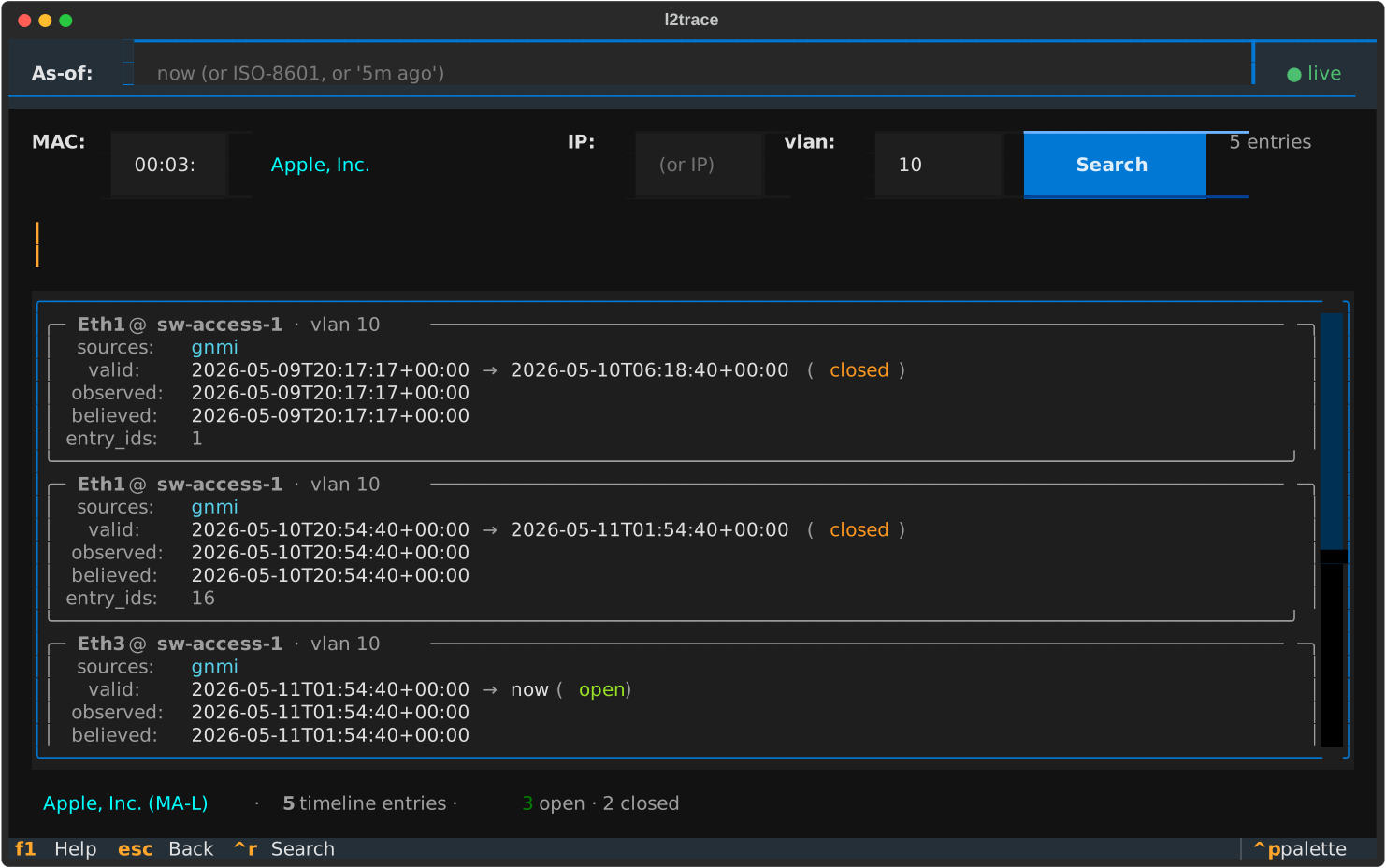
Each timeline entry is one logical “this MAC was here for this window”.
Cross-source observations get collapsed — if gNMI and SNMP both saw
the MAC on the same port at the same time, they appear as one entry
with sources: gnmi, snmp.
What each field means:
| Field | Description |
|---|---|
| Title | port @ device plus VLAN |
sources | Which collectors observed this row |
valid | Wire-time range — when it was on the network. open = current, closed = aged out / moved |
observed | Earliest device-clock observation |
believed | Earliest time the system recorded this belief |
entry_ids | The actual primary keys — useful when joining manually |
The gap between observed and believed is the latency for that row.
A big gap (~seconds OK; minutes is bad) signals either device-clock skew
or queue-dwell. The quarantine pane tells
you which.
If the OUI registry is populated, the summary at the bottom shows the
vendor: Cisco Systems, Inc · 3 timeline entries · 1 open · 2 closed.
In SQL
Section titled “In SQL”The query backing the HISTORY screen lives in db/queries.mac_history().
It does the cross-source collapse for you:
WITH q AS ( SELECT mo.entry_id, mo.device_id, d.hostname AS device_hostname, mo.port_id, p.name AS port_name, mo.vlan, mo.source, mo.observed_at, mo.collector_emitted_at, lower(mo.valid_during) AS valid_from, upper(mo.valid_during) AS valid_to, lower(mo.recorded_during) AS recorded_from FROM mac_observation mo JOIN device d ON d.id = mo.device_id JOIN port p ON p.id = mo.port_id WHERE mo.mac = :mac AND (:vlan::int IS NULL OR mo.vlan = :vlan) AND mo.recorded_during @> COALESCE(:audit_at, now()) ORDER BY mo.valid_during, mo.source)SELECT * FROM q;audit_at is the belief-time. Pass NULL or now() for “current belief”.
In Python
Section titled “In Python”from l2trace.db.session import session_scopefrom l2trace.db.queries import mac_history
async with session_scope() as session: rows = await mac_history(session, mac="aa:bb:cc:11:22:33", vlan=10)for row in rows: print(row.port_name, row.device_hostname, row.sources, row.is_open)See also
Section titled “See also”- What the four event timestamps mean — to
interpret
observed_atvscollector_emitted_atvsbelieved - How to spot disagreements — when sources disagree about where a MAC is